• Fri frakt över 249 kr
  • •
  • Snabba leveranser
  • •
  • Billiga böcker
Kundservice

Du är på sajten för privatpersoner.

Företag, bibliotek eller offentlig verksamhet?

Du handlar på classic.bokus.com, där alla dina funktioner finns intakta.
Till classic.bokus.com
Bokus logotyp. Gå till startsidan.
  • Erbjudanden
  • Nyheter
  • Student
  • Topplistor
  • Barn & ungdom
  • Bokus Play
  • E-böcker
  • Pocketböcker
  • Spel & pussel

10% rabatt på allt med kod: NYSTART10 →

Sidfot

Mina sidor

    Hjälp

    • Kundservice
    • Vanliga frågor och svar
    • Frakt och leverans
    • Retur vid ångerrätt
    • Reklamera vara
    • Betalning
    • Köpvillkor
    • Allmänna villkor
    • Information om webbplatsens tillgänglighet

    Om Bokus

    • Om oss
    • Pressrum
    • För studenter
    • För företag
    • För bibliotek och offentlig verksamhet
    • För leverantörer
    • Hållbarhet

    Populärt

    • Aktuella erbjudanden
    • Presentkort
    • Studentlitteratur
    • Nya böcker
    • Topplistor
    • Signerade böcker
    • Engelska böcker

    Inspiration

    • Boktips
    • BookTok
    • Populära bokserier
    • Barnbokskaraktärer
    • Populära författare
    Logotyp för Bokus
    Följ oss på Facebook (extern länk)Följ oss på Instagram (extern länk)Följ oss på YouTube (extern länk)Följ oss på TikTok (extern länk)
    bokus @ CookiesAnpassa cookiesIntegritetspolicyKöpvillkor
    Till Citymail hemsida (extern länk)Till Budbee hemsida (extern länk)Till Postnord hemsida (extern länk)Till Schenker hemsida (extern länk)Till Early Bird hemsida (extern länk)Till Walleys hemsida (extern länk)
    1. Ekonomi och Ledarskap
    2. Företagsekonomi
    3. Organisation och ägarskap

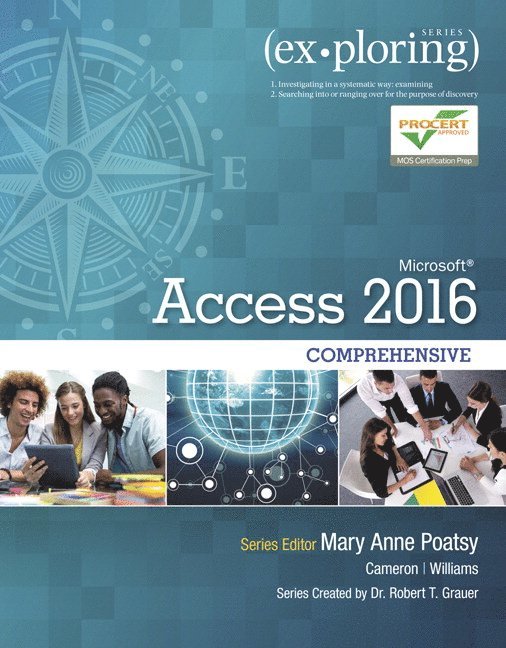
    Exploring Microsoft Office Access 2016 Comprehensive

    AvMary Anne Poatsy,Eric Cameron

    Häftad, Engelska, 2016

    Del i serien Exploring for Office 2016 Series

    2 245 kr

    Tillfälligt slut

    Beskrivning

    This book offers full, comprehensive coverage of Microsoft Access.


    Beyond point-and-click

    The goal of the Exploring series is to move students beyond the point-and-click, to understanding the why and how behind each skill. And because so much learning takes place outside of the classroom, this series provides learning tools that students can access anywhere, anytime. Students go to college now with a different set of skills than they did years ago. With this in mind, the Exploring series seeks to move students beyond the basics of the software at a faster pace, without sacrificing coverage of the fundamental skills that everyone needs to know.


    Also available with MyITLab

    MyITLab® is an online homework, tutorial, and assessment program designed for Information Technology (IT) courses, which engages students and improves results. HTML5 Simulation exercises and Live-in-Application Grader projects come with the convenience of auto-grading and instant feedback, helping students learn more quickly and effectively. Digital badges lets students showcase their Microsoft Office or Computer Concepts competencies, keeping them motivated and focused on their future careers. MyITLab builds the critical skills needed for college and career success.


    Note: You are purchasing a standalone product; MyITLab does not come packaged with this content. Students, if interested in purchasing this title with MyITLab, ask your instructor for the correct package ISBN and Course ID. Instructors, contact your Pearson representative for more information.

    Produktinformation

    • Utgivningsdatum:2016-05-20
    • Mått:100 x 100 x 100 mm
    • Vikt:100 g
    • Format:Häftad
    • Språk:Engelska
    • Serie:Exploring for Office 2016 Series
    • Antal sidor:736
    • Upplaga:1
    • Förlag:Pearson Education
    • ISBN:9780134479453

    Utforska kategorier

    • Organisation och ägarskap inom Ekonomi och Ledarskap

    Mer om författaren

    Mary Anne Poatsy, Series EditorMary Anne is a senior faculty member at Montgomery County Community College, teaching various computer application and concepts courses in face-to-face and online environments. She holds a B.A. in Psychology and Education from Mount Holyoke College and an M.B.A. in Finance from Northwestern University’s Kellogg Graduate School of Management. Mary Anne has more than 12 years of educational experience. She is currently adjunct faculty at Gwynedd-Mercy College and Montgomery County Community College. She has also taught at Bucks County Community College and Muhlenberg College, as well as conducted personal training. Before teaching, she was Vice President at Shearson Lehman in the Municipal Bond Investment Banking Department. Eric CameronEric Cameron is a tenured Associate Professor at Passaic County Community College, where he has taught in the Computer and Information Sciences department since 2001. He holds an M.S. in Computer Science and a B.S. degree in Computer Science with minors in Mathematics and Physics, both from Montclair State University. He currently co-chairs the College’s General Education committee and served as a member of the College’s Academic Assessment, College Writing, and Educational Technology committees at various points. Eric has also developed degrees in Graphic Design and Medical Informatics for the College. Eric previously worked as a software engineer both as a full-time employee and contractor, most recently for ITT/Exelis (now part of Harris Corporation). This is Eric’s fourth publication for Pearson, after authoring Web 2.0 and Windows 8 books in the Your Office series and co-authoring the Exploring Access 2013 text.  Jerri WilliamsJerri Williams is a Senior Instructor at Montgomery County Community College in Pennsylvania. Jerri also works as an independent corporate trainer, technical editor, and content developer. She is interested in travel, cooking, movies, and tending to her colonial farmhouse. Jerri is married, and is the mother of two daughters, Holly (an Accounting graduate and full-time mother to an adorable son, Meir) and Gwyneth (a corporate defense attorney). Jerri and Gareth live in the suburbs of Philadelphia. They enjoy their home and garden, and spending time with family and good friends. Amy RutledgeAmy Rutledge is a Special Instructor of Management Information Systems at Oakland University in Rochester, Michigan. She coordinates academic programs in Microsoft Office applications and introductory management information systems courses for the School of Business Administration. Before joining Oakland University as an instructor, Amy spent several years working for a music distribution company and automotive manufacturer in various corporate roles including IT project management. She holds a B.S. in Business Administration specializing in Management Information Systems, and a B.A. in French Modern Language and Literature. She holds an M.B.A from Oakland University. She resides in Michigan with her husband, Dan and daughters Emma and Jane.   Dr. Robert T. Grauer, Creator of the Exploring SeriesBob Grauer is Professor Emeritus in the Department of Computer Information Systems at the University of Miami, where he is a multiple winner of the Outstanding Teaching Award in the School of Business, most recently in 2009. He has written numerous COBOL texts and is the vision behind the Exploring Office series, with more than three million books in print. His work has been translated into three foreign languages and is used in all aspects of higher education at both national and international levels. Bob Grauer has consulted for several major corporations including IBM and American Express. He received his Ph.D. in Operations Research in 1972 from the Polytechnic Institute of Brooklyn.

    Innehållsförteckning

    • Office 2016 Common Features  Access Chapter 1 Introduction to Access Chapter 2 T ables and Queries in Relational Databases Chapter 3 Using Queries to Make Decisions Chapter 4 Creating and Using Professional Forms and Reports Chapter 5 Data Validation and Data Analysis Chapter 6 Action and Specialized Queries Chapter 7 Advanced Forms and Reports Chapter 8 Get Connected Chapter 9 Fine-Tuning the Database Chapter 10 Using Macros and SQL in Access Access Introductory Capstone Exercise (Chs. 1—4) Access Comprehensive Capstone Exercise (Chs. 5—10) MICROSOFT OFFICE 2016 SPECIALIST ACCESS Glossary Index Application Capstone Exercises