• Fri frakt över 249 kr
  • •
  • Snabba leveranser
  • •
  • Billiga böcker
Kundservice

Du är på sajten för privatpersoner.

Företag, bibliotek eller offentlig verksamhet?

Du handlar på classic.bokus.com, där alla dina funktioner finns intakta.
Till classic.bokus.com
Bokus logotyp. Gå till startsidan.
  • Erbjudanden
  • Nyheter
  • Student
  • Topplistor
  • Barn & ungdom
  • Bokus Play
  • E-böcker
  • Pocketböcker
  • Spel & pussel

10% rabatt på allt med kod: NYSTART10 →

Sidfot

Mina sidor

    Hjälp

    • Kundservice
    • Vanliga frågor och svar
    • Frakt och leverans
    • Retur vid ångerrätt
    • Reklamera vara
    • Betalning
    • Köpvillkor
    • Allmänna villkor
    • Information om webbplatsens tillgänglighet

    Om Bokus

    • Om oss
    • Pressrum
    • För studenter
    • För företag
    • För bibliotek och offentlig verksamhet
    • För leverantörer
    • Hållbarhet

    Populärt

    • Aktuella erbjudanden
    • Presentkort
    • Studentlitteratur
    • Nya böcker
    • Topplistor
    • Signerade böcker
    • Engelska böcker

    Inspiration

    • Boktips
    • BookTok
    • Populära bokserier
    • Barnbokskaraktärer
    • Populära författare
    Logotyp för Bokus
    Följ oss på Facebook (extern länk)Följ oss på Instagram (extern länk)Följ oss på YouTube (extern länk)Följ oss på TikTok (extern länk)
    bokus @ CookiesAnpassa cookiesIntegritetspolicyKöpvillkor
    Till Citymail hemsida (extern länk)Till Budbee hemsida (extern länk)Till Postnord hemsida (extern länk)Till Schenker hemsida (extern länk)Till Early Bird hemsida (extern länk)Till Walleys hemsida (extern länk)
    1. Data och IT
    2. Programmeringsböcker
    3. Webbprogrammering

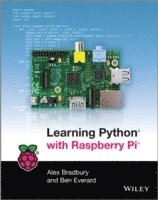
    Learning Python with Raspberry Pi

    AvAlex Bradbury,Ben Everard

    Häftad, Engelska, 2014

    222 kr

    Beställningsvara. Skickas inom 5-8 vardagar. Fri frakt över 249 kr.

    Beskrivning

    The must-have companion guide to the Raspberry Pi User Guide!Raspberry Pi chose Python as its teaching language of choice to encourage a new generation of programmers to learn how to program. This approachable book serves as an ideal resource for anyone wanting to use Raspberry Pi to learn to program and helps you get started with the Python programming language. Aimed at first-time developers with no prior programming language assumed, this beginner book gets you up and running. Covers variables, loops, and functionsAddresses 3D graphics programmingWalks you through programming MinecraftZeroes in on Python for scriptingLearning Python with Raspberry Pi proves itself to be a fantastic introduction to coding.

    Produktinformation

    • Utgivningsdatum:2014-03-12
    • Mått:191 x 234 x 18 mm
    • Vikt:567 g
    • Format:Häftad
    • Språk:Engelska
    • Antal sidor:288
    • Förlag:John Wiley & Sons Inc
    • ISBN:9781118717059

    Utforska kategorier

    • Webbprogrammering inom Data och IT

    Mer om författaren

    Alex Bradbury (Cambridge, UK) is the Lead Software Developer on the Raspberry Pi.Russel Winder (London, UK) was Professor of Computer Science at Kings College London and is the co-author of several tech books, including Developing Java Software and Python for Rookies. He lectures on Python at Skills Matter.

    Recensioner i media

    "An excellent book for beginners to both the Raspberry Pi and the Python Language." (Linux Voice, June 2014) "... I'd fully recommend the book to anyone wanting to get into Python.... This is great for beginners to the language and for those seeking to go deeper into some of the available libraries. Congratulations??should go out to the authors on the creation of a great resource." (Raspberry Pi Pod, June 2014)

    Innehållsförteckning

    • Introduction 1What Is Programming? 1Why the Raspberry Pi? 2How Does this Book Work? 2Chapter 1 Getting Up and Running 5Setting Up Your Raspberry Pi 5Solving Problems 6A Quick Tour of Raspbian 7Using LXDE (Lightweight X11 Desktop Environment) 7Using the Terminal 8Changing Configurations with Raspi-Config 10Installing Software 10Python 3 11The Python Interpreter 11Running Python Programs 11Summary 12Chapter 2 A Really Quick Introduction to Python 13Drawing Picture with Turtles 13Using Loops 16Conditionals: if, elif, and else 18Using Functions and Methods to Structure Code 20A Python Game of Cat and Mouse 21Understanding Variables 24Defining Functions 24Looping Through the Game 25Summary 26Chapter 3 Python Basics 27Variables, Values, and Types 27Values Have Types 28Storing Numbers 29Keeping Text in Strings 30Boolean: True or False 31Converting Between Data Types 32Test Your Knowledge 32Exercise 1 33Storing Values in Structures 33Non-Sequential Values in Dictionaries and Sets 37Test Your Knowledge 38Controlling the Way the Program Flows 38Moving Through Data with for Loops 39Going Deeper with Nested Loops 40Branching Execution with if Statements 41Catching Exceptions 42Exercise 2 43Making Code Reusable with Functions 43Optional Parameters 46Bringing Everything Together 46Exercise 3 48Building Objects with Classes 49Getting Extra Features from Modules 54Summary 55Solutions to Exercises 56Exercise 1 56Exercise 2 56Exercise 3 56Chapter 4 Graphical Programming 57Graphical User Interface (GUI) Programming 58Adding Controls 60Test Your Knowledge 62Exercise 1 62Creating a Web Browser 62Adding Window Menus 71Test Your Knowledge 73Exercise 2 73Summary 74Solutions to Exercises 74Exercise 1 74Exercise 2 76Chapter 5 Creating Games 77Building a Game 79Initialising PyGame 82Creating a World 86Detecting Collisions 88Moving Left and Right 90Reaching the Goal 92Making a Challenge 93Making It Your Own 97Adding Sound 98Adding Scenery 99Adding the Finishing Touches 101Taking the Game to the Next Level 102Realistic Game Physics 103Summary 108Chapter 6 Creating Graphics with OpenGL 109Getting Modules 110Creating a Spinning Cube 110Vectors and Matrices 112Bringing It All Together 116Let There Be Light 120Calculating the Distance of the Point from the Light Source 120Calculating Reflecting Angles 121Making the Screen Dance 126Building the 3D Model 128Calculating the Sound Level 129Taking Things Further 135Adding Some Texture 136Summary 136Chapter 7 Networked Python 139Understanding Hosts, Ports, and Sockets 139Locating Computers with IP Addresses 140Building a Chat Server 141Tweeting to the World 144Weather Forecasts with JSON 147Testing Your Knowledge 149Exercise 1 149Getting On the Web 149Making Your Website Dynamic 151Using Templates 153Sending Data Back with Forms 153Exercise 2 155Keeping Things Secure 155Summary 159Solutions to Exercises 160Exercise 1 160Exercise 2 161Chapter 8 Minecraft 163Exploring Minecraft 164Controlling Your Minecraft World 164Creating Minecraft Worlds in Python 165Building Worlds 166Drawing Pictures 166Taking Things Further 169Making the Game Snake 169Moving the Snake 173Growing the Snake 173Adding the Apples 174Taking Things Further 175Summary 175Chapter 9 Multimedia 177Using PyAudio to Get Sound into Your Computer 177Recording the Sound 179Speaking to Your Pi 180Asking the Program Questions 181Putting It All Together 182Taking Things Further 184Making Movies 184Using USB Webcams 185Adding Computer Vision Features with OpenCV 187Taking Things Further 190Using the Raspberry Pi Camera Module 190Creating Live Streams 193Taking Things Further 196Summary 196Chapter 10 Scripting 197Getting Started with the Linux Command Line 197Using the Subprocess Module 200Command-Line Flags 202Regular Expressions 203Testing Your Knowledge 206Scripting with Networking 207Bringing It All Together 209Working with Files in Python 216Summary 217Chapter 11 Interfacing with Hardware 219Setting Up Your Hardware Options 219Female to Male Jumper Wires 219Pi Cobbler 220Solderless Breadboard 221Stripboards and Prototyping Boards 221PCB Manufacturing 222Getting the Best Tools 222Wire Cutters/Strippers 222Multimeters 222Soldering Irons 222Hardware Needed for this Chapter 223The First Circuit 224Protecting Your Pi 228Power Limits 229Getting Input 229Expanding the GPIO Options with I2C, SPI, and Serial 231The SPI Communications Protocol 231The I2C Communications Protocol 235The Serial Communications Protocol 236Taking the Example Further 236Arduino 236PiFace 237Gertboard 237Wireless Inventor’s Kit 238Trying Some Popular Projects 238Robots 238Home Automation 239Burglar Alarms 239Digital Art 239Summary 239Chapter 12 Testing and Debugging 241Investigating Bugs by Printing Out the Values 241Finding Bugs by Testing 245Checking Bits of Code with Unit Tests 245Getting More Assertive 250Using Test Suites for Regression Testing 252Testing the Whole Package 253Making Sure Your Software’s Usable 254How Much Should You Test? 254Summary 255Index 257