• Fri frakt över 249 kr
  • •
  • Snabba leveranser
  • •
  • Billiga böcker
Kundservice

Du är på sajten för privatpersoner.

Företag, bibliotek eller offentlig verksamhet?

Du handlar på classic.bokus.com, där alla dina funktioner finns intakta.
Till classic.bokus.com
Bokus logotyp. Gå till startsidan.
  • Erbjudanden
  • Nyheter
  • Student
  • Topplistor
  • Barn & ungdom
  • Bokus Play
  • E-böcker
  • Pocketböcker
  • Spel & pussel

10% rabatt på allt med kod NYSTART10 →

Sidfot

Mina sidor

    Hjälp

    • Kundservice
    • Vanliga frågor och svar
    • Frakt och leverans
    • Retur vid ångerrätt
    • Reklamera vara
    • Betalning
    • Köpvillkor
    • Allmänna villkor
    • Information om webbplatsens tillgänglighet

    Om Bokus

    • Om oss
    • Pressrum
    • För studenter
    • För företag
    • För bibliotek och offentlig verksamhet
    • För leverantörer
    • Hållbarhet

    Populärt

    • Aktuella erbjudanden
    • Presentkort
    • Studentlitteratur
    • Nya böcker
    • Topplistor
    • Signerade böcker
    • Engelska böcker

    Inspiration

    • Boktips
    • BookTok
    • Populära bokserier
    • Barnbokskaraktärer
    • Populära författare
    Logotyp för Bokus
    Följ oss på Facebook (extern länk)Följ oss på Instagram (extern länk)Följ oss på YouTube (extern länk)Följ oss på TikTok (extern länk)
    bokus @ CookiesAnpassa cookiesIntegritetspolicyKöpvillkor
    Till Citymail hemsida (extern länk)Till Budbee hemsida (extern länk)Till Postnord hemsida (extern länk)Till Schenker hemsida (extern länk)Till Early Bird hemsida (extern länk)Till Walleys hemsida (extern länk)
    1. Data och IT
    2. Affärsapplikationer

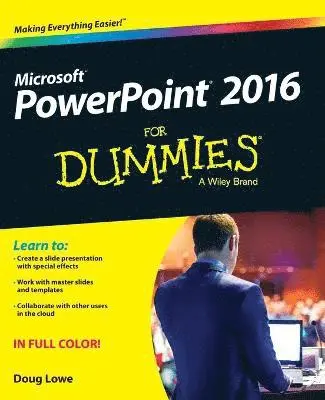
    PowerPoint 2016 For Dummies

    AvDoug Lowe

    Häftad, Engelska, 2015

    261 kr

    Beställningsvara. Skickas inom 5-8 vardagar. Fri frakt över 249 kr.

    Fler format och utgåvor

    E-bok

    317 kr

    E-bok

    317 kr

    Beskrivning

    Get up and running with PowerPoint 2016Does using PowerPoint make you want to pull your hair out? PowerPoint 2016 For Dummies takes the pain out of working with PowerPoint, offering plain-English explanations of everything you need to know to get up and running with the latest version of the software. With full-color illustrations and step-by-step instructions, it shows you how to create and edit slides, import data from other applications, collaborate with other users in the Cloud, add charts, clip art, sound, and video—and so much more.PowerPoint is the world's de facto presentation software, used and supported in over 60 countries. The time has never been better to take advantage of the latest software to make killer PowerPoint presentations. From adding special effects to your presentations to working with master slides and templates, this hands-on friendly guide is the fast and easy way to make PowerPoint work for you. Presented in full color to better illustrate the powerful presentation features of the softwareHelps you take advantage of all of PowerPoint's new featuresAvailable in conjunction with the release of the next version of Microsoft OfficeWritten by bestselling author Doug LoweIf you're a new or inexperienced PowerPoint user who spends more time trying to figure out how the software works than you do actually working on your presentations, PowerPoint 2016 For Dummies is just what you need to gain back hours of your work day and make professional, impactful presentations.

    Produktinformation

    • Utgivningsdatum:2015-11-03
    • Mått:183 x 226 x 18 mm
    • Vikt:567 g
    • Format:Häftad
    • Språk:Engelska
    • Antal sidor:352
    • Förlag:John Wiley & Sons Inc
    • ISBN:9781119077053

    Utforska kategorier

    • Affärsapplikationer inom Data och IT

    Mer om författaren

    Doug Lowe is a veteran author with more than 40 For Dummies books to his credit, including titles on everything from Microsoft Office productivity with PowerPoint to networking to programming in ASP.NET.

    Innehållsförteckning

    • Introduction 1Part I: Getting Started with PowerPoint 2016 5Chapter 1: Welcome to PowerPoint 2016 7Chapter 2: Editing Slides 31Chapter 3: Working in Outline View 47Chapter 4: Proofing Your Presentations 53Chapter 5: Don’t Forget Your Notes! 63Chapter 6: Show Time! 69Part II: Creating Great‐Looking Slides 85Chapter 7: All about Fonts and Text Formatting 87Chapter 8: Designing Your Slides 103Chapter 9: Animating Your Slides 117Chapter 10: Masters of the Universe Meet the Templates of Doom 135Part III: Embellishing Your Slides 157Chapter 11: Inserting Pictures 159Chapter 12: Drawing on Your Slides 177Chapter 13: Charting for Fun and Profit 197Chapter 14: Working with SmartArt 215Chapter 15: Lights! Camera! Action! (Adding Sound and Video) 227Chapter 16: More Things to Insert on Your Slides 239Part IV: Working with Others 265Chapter 17: Collaborating in the Cloud 267Chapter 18: Using a Slide Library and Other Ways to Reuse Slides 277Chapter 19: Exporting Your Presentation to Other Formats 283Part V: The Part of Tens 295Chapter 20: Ten PowerPoint Commandments 297Chapter 21: Ten Tips for Creating Readable Slides 301Chapter 22: Ten Ways to Keep Your Audience Awake 305Index 309